Learning how to turn a business idea into a working prototype in 45 days is easier than most beginners think.
Every business starts as an idea, but few ideas become real products. If you want to turn a business idea into a prototype, a clear plan matters more than a big budget. This guide shows you how to build a business prototype in 45 days, whether you are creating software, a physical product, or a service.
What Is a Prototype, and Why Does It Matter?
A prototype is an early, simplified version of your product that helps you test how it works and whether people want it. It does not need to be polished, only functional enough to collect real feedback.
This is why many founders turn a business idea into a working prototype before building the full product.
These related terms are often confused:
- Mockup: a visual design of how the product will look.
- Proof of concept: a small test showing the idea is technically possible.
- Minimum viable product (MVP): a basic version with just enough features for early customers to use.
Before you build an MVP, a prototype helps you find problems early, when they are cheap to fix.
Before You Start: Confirm the Idea Is Worth Building
Spend a few days on basic product validation. Talk to potential customers, review what competitors offer, and write one sentence describing the problem you solve and for whom. If you cannot do this, your prototype will likely lack direction.
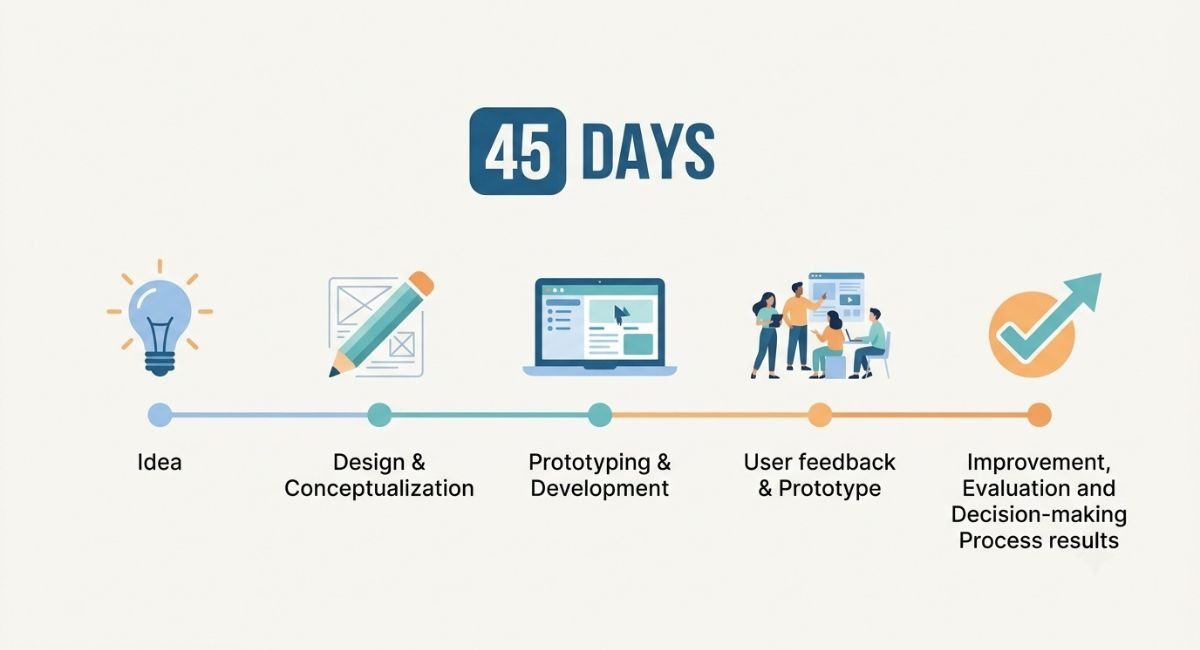
Your 45-Day Plan to Turn a Business Idea into a Prototype
Days 1–7: Define the Problem and Core Features
Write down the main problem, your target user, and the three most important features. Everything else can wait. This is the heart of any first-time founder prototype checklist: fewer features, clearer purpose.
“Turning a business idea into a working prototype helps you spot problems before you spend real money.”
Days 8–14: Sketch and Plan
Create simple sketches or wireframes on paper or in a free design tool. For a physical product, draw it from several angles and list the materials you need. For an app or website, map the screens a user will move through.
Days 15–30: Build the First Version
This stage is where you turn a business idea into a working prototype.
How you build depends on your product:
- Software or apps: The best no-code tools for a startup prototype include Bubble, Glide, Adalo, and Webflow, while Figma is widely used for clickable designs. These platforms let you create a working prototype without coding experience.
- Physical products: Start with hand-made models using inexpensive materials. For more precise versions, 3D modelling tools such as Tinkercad or Fusion 360 can be paired with a 3D printing service. Local makerspaces often offer shared equipment at lower cost.
- Services: Test manually first. Deliver the service to a few people yourself before building systems around it.
If you lack the skills, you can hire a freelancer through platforms such as Upwork or Fiverr. Define your requirements in writing, agree on milestones, and review the work before releasing full payment.
Days 31–40: Test With Real Users
Learning how to test a prototype with real customers is the most valuable part of this process. Put your prototype in front of 5–10 people from your target audience. Ask them to use it while you observe, and avoid explaining too much. Note where they hesitate or get confused.
Useful questions include:
- What did you expect this to do?
- What was confusing?
- Would you use or pay for this? Why or why not?
Feedback from strangers is generally more candid than feedback from friends and family.
Days 41–45: Improve and Decide
Review your notes and look for patterns. Fix the problems that appear repeatedly, and set aside one-off opinions. Then decide whether to continue, change direction, or stop. Stopping after a low-cost test is a valid outcome, not a failure.
By now, you have turned a business idea into a working prototype you can test.
A working prototype helps you test your business idea before spending money.
How to Build a Prototype on a Low Budget
It is realistic to build a prototype on a low budget if you stay disciplined:
- Use free or low-cost tiers of no-code and design tools.
- Build only the core feature.
- Reuse existing components instead of creating everything from scratch.
- Test demand cheaply with surveys or a simple landing page before manufacturing or development.
Costs vary widely by product type, so set a fixed budget early and track it.
Where to Find Support as a Founder
- Startup incubators and accelerators: Programs such as Y Combinator and Techstars are well known, and many cities and universities run beginner-friendly programs.
- Small business services: Small Business Development Centers in the United States and the Enterprise Europe Network in Europe offer advice to early-stage businesses.
- University innovation hubs and makerspaces: Often open to local entrepreneurs.
Eligibility and funding change over time, so check each official website. If you plan to sell commercially, consult a qualified professional about registration, taxes, regulations, and intellectual property in your country.
Common Mistakes to Avoid
- Adding too many features too early
- Skipping customer testing
- Treating the prototype as a final product
- Spending heavily before validation
- Ignoring negative feedback
Final Thoughts
You do not need a large budget or a technical background to turn your business idea into a prototype. You need a clear problem, a simple first version, and the willingness to learn from real users. Follow this plan, stay flexible, and let feedback guide your next move.
Turning your business idea into a working prototype does not need a big budget
You do not need a large budget or a technical background to turn a business idea into a working prototype. You need a clear problem, a simple first version, and the willingness to learn from real users. Follow this 45-day plan, stay flexible, and let feedback guide your next move. A small working prototype today is worth more than a perfect idea that stays on paper.Not sure your idea is worth building yet? Read our guide on how to validate a business idea in 30 days before you begin.
FAQs
Can I build a prototype with no developer?
Yes. No-code tools let beginners build basic app and website prototypes, though complex products may eventually need professional development.
How much does a prototype cost?
It depends on the product. A simple digital prototype can cost very little, while physical prototypes with custom materials cost more.
Is a prototype the same as an MVP?
Not exactly. A prototype is mainly for testing and learning, while an MVP is a usable version released to early customers.

Ali Hamza is the writer behind IdeaBloomer, a blog that shares practical, beginner-friendly guides on business ideas, startup planning, and turning ideas into action. Each article is researched using official and reputable sources, written in plain language, and updated when information changes. His goal is to help new entrepreneurs take clear, realistic first steps.
1 thought on “How to Turn a Business Idea into a Working Prototype in 45 Days”